Mastering the intricacies of academic writing is a journey, and a perfectly crafted Works Cited page is your passport to credibility and scholarly excellence. This isn't just a formality; it's a testament to your thorough research and integrity. Truly optimizing your MLA Works Cited page for academic success means transforming a list of sources into a powerful statement about your command of scholarship. It reassures your reader, demonstrates your ethical engagement with others' ideas, and, crucially, protects you from unintentional plagiarism.
Think of your Works Cited page as the definitive map for your readers, guiding them directly to the sources that shaped your arguments. It’s where your academic honesty shines brightest, ensuring every idea you've borrowed or built upon is properly acknowledged.
At a Glance: Key Takeaways for a Stellar Works Cited Page
- Start Fresh: Always begin on a new page at the end of your paper.
- Header & Margins: Maintain your standard paper header (last name, page number) and one-inch margins.
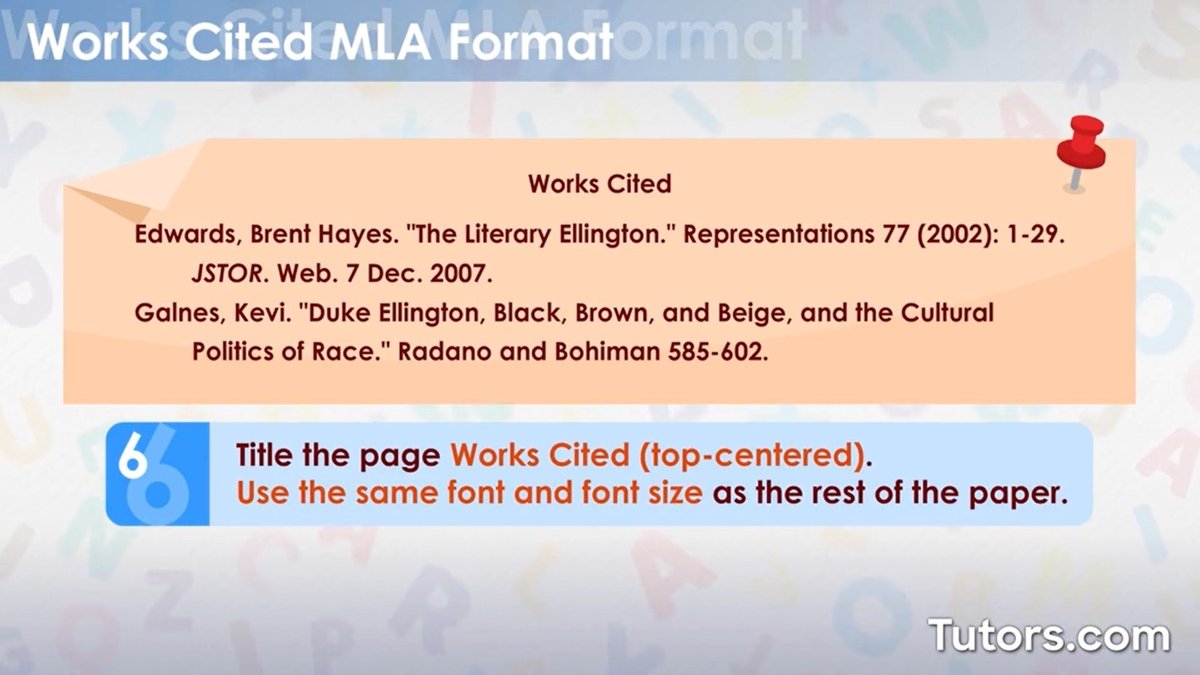
- "Works Cited" Title: Center this title at the top; no fancy formatting.
- Double-Space Everything: All entries and the title should be double-spaced.
- Hanging Indent: The first line of each entry is flush left; subsequent lines are indented 0.5 inches.
- Alphabetize: Order entries strictly by the first item (usually author's last name).
- Core Elements: Apply the MLA 9th edition's "container model" with its nine core elements for each source.
- Punctuation Matters: Every period, comma, and colon serves a purpose; use them precisely.
- Distinguish Wisely: Know the difference between a "Works Cited" (sources used) and a "Bibliography" (sources consulted).
The Unseen Foundation: Why Your Works Cited Page Matters More Than You Think
Before we dive into the nitty-gritty of formatting, let's underscore why this section of your paper isn't merely an appendix, but a critical component of your academic success. Your Works Cited page is the final demonstration of your research rigor. It offers transparency, allowing your instructors and peers to trace your intellectual journey and verify your sources. More importantly, it safeguards you against accusations of plagiarism, a severe academic offense that can derail your entire career.
Imagine your paper as a complex structure, and your sources as the raw materials. The Works Cited page is the architect's blueprint, meticulously listing every piece, its origin, and where it can be found. Without it, your structure lacks foundation and accountability.
Setting the Stage: Essential Formatting Pillars
Just as a house needs a strong foundation, your Works Cited page needs a consistent and correct basic structure. These rules are non-negotiable and apply to every single entry.
Margins, Headers, and That Crucial Title
Maintain the one-inch margins that you've used throughout your entire paper. Your running header, featuring your last name and the page number in the top-right corner, should also continue onto your Works Cited page.
At the very top of this new page, centered, you'll place the title: "Works Cited." Resist the urge to italicize, bold, underline, or put it in quotation marks. It stands alone, clear and unambiguous, signaling to your reader exactly what follows.
The Art of Alignment, Spacing, and Indentation
Once your title is centered, your individual citation entries will begin. Each entry should be left-aligned. Perhaps the most common formatting mistake, and the easiest to correct, involves spacing: every single line on your Works Cited page, from the title down to the last word of your last entry, must be double-spaced. No exceptions, no extra spaces between entries. This ensures visual consistency and readability.
Then there's the distinctive hanging indent. This means the first line of each entry begins flush with the left margin, and every subsequent line of that same entry is indented 0.5 inches. This creates a clear visual hierarchy, making it simple for readers to quickly scan down the left margin and identify individual sources.
Quick Guide: Creating a Hanging Indent in Microsoft Word
For those using Microsoft Word, setting up a hanging indent is straightforward:
- Highlight all your Works Cited entries.
- Go to the "Home" tab on the ribbon.
- In the "Paragraph" section, click the small arrow in the lower-right corner to open the Paragraph Settings dialog box.
- Under the "Indentation" section, find the "Special" dropdown menu and select "Hanging."
- Confirm that the "By" field is set to "0.5 inches."
- Click "OK." Voila! Your entries now have the correct indentation.
Alphabetical Order: The Golden Rule of Organization
Every single source on your Works Cited page must be alphabetized. How do you decide the order? By the very first item in the citation entry, which is almost always the author's last name. If a source has no author, you'll alphabetize it by the first significant word of its title (ignoring articles like "A," "An," or "The"). Even if a title starts with a number, alphabetize it as if the number were spelled out (e.g., "1984" would be alphabetized under "N" for "Nineteen Eighty-Four"). Ignore symbols like hashtags for alphabetization purposes.
Precision in Punctuation
Every Works Cited entry concludes with a period. This might seem minor, but it's part of the meticulous attention to detail MLA demands. Each element within an entry also has its specific punctuation (commas, colons, periods), which we'll explore further when discussing the core elements.
Navigating the MLA 9th Edition: The "Container" Model
The MLA 9th edition introduced a wonderfully intuitive "container model" that simplifies the citation process. Instead of memorizing countless rules for different source types, you apply a single, adaptable template. Every source lives within one or more "containers"—a larger work that holds the smaller piece you're citing. For example, an article (the source) is contained within a journal (the first container), which might be contained within a database (the second container).
This model asks you to identify up to nine "core elements" for each source. While not every source will have all nine, you should strive to provide as much information as possible.
The Nine Core Elements (and Their Punctuation)
Here are the nine core elements in order, along with the punctuation that follows each (unless it's the final element, which ends with a period):
- Author’s name. (followed by a period)
- Title of source. (followed by a period)
- Title of the container, (followed by a comma)
- Other editors, translators, contributors, (followed by a comma)
- Version, (followed by a comma)
- Number, (followed by a comma)
- Publisher, (followed by a comma)
- Publication date, (followed by a comma)
- Location. (followed by a period)
Location typically refers to page numbers, a DOI (Digital Object Identifier), or a URL.
Optional Elements: You might also include elements like the date of access, date of original publication, or media format, especially if they are particularly relevant or helpful for your reader.
Using a reliable tool like a free MLA citation generator can be immensely helpful for ensuring these elements are correctly identified and formatted, especially as you get the hang of the container model.
Details That Distinguish: Authors, Titles, and Page Numbers
While the core elements provide the structure, specific rules for handling names, titles, and page references are crucial for accuracy.
Mastering Author Names
- Standard Format: List author names (or editor names for collections) alphabetically by last name, then first name, then middle name/initial (e.g., Burke, Kenneth).
- No Titles/Degrees: Do not include honorifics like "Dr.," "Sir," or academic degrees like "PhD."
- Suffixes: Include suffixes like "Jr." or "II" after the first or middle name, separated by a comma (e.g., King, Martin Luther, Jr.).
- Multiple Authors: For two authors, use "Author1, Firstname, and Firstname Author2." For three or more, list the first author's name followed by "et al."
- Multiple Works by One Author: If you're citing more than one work by the same author, order those entries alphabetically by title. For the second and subsequent entries by that author, replace the author's name with three hyphens (---). Solo-author works are listed before works where the author is the first of a group.
Handling Works with No Known Author
When a work has no known author, you simply alphabetize the entry by its title. In your parenthetical in-text citations, you'll use a shortened version of this title.
Pseudonyms, Stage Names, and Published Aliases (MLA 9th Edition)
MLA 9th edition offers nuanced guidance for names that aren't straightforward:
- Well-Known Pseudonyms: If a person is commonly known by a pseudonym, cite the better-known form (e.g., Lewis Carroll instead of Charles Dodgson).
- Pseudonym + Real Name: If the real name is less well-known than the pseudonym but still relevant, cite the pseudonym first, then the real name in square brackets (e.g., Christie, Agatha [Mary Westmacott]).
- "Published As": If the cited name differs from the name actually published on the work, include "[published as: Lastname, Firstname]" in square brackets.
- Cross-References: For alternative names, you can create separate entries with cross-references (e.g., Eliot, George [see also Evans, Mary Anne]).
Capitalization Rules for Titles
Capitalize each principal word in titles of articles, books, films, etc. However, do not capitalize articles (the, an, a), short prepositions (e.g., of, in, with), or coordinating conjunctions (and, but, or, for, nor, so, yet) unless they are the very first word of the title or subtitle.
Italics vs. Quotation Marks: A Critical Distinction
This is a common point of confusion. The rule is simple:
- Italicize titles of larger, self-contained works or containers (e.g., books, magazines, films, television series, websites, databases).
- Use quotation marks for titles of shorter works or works that are part of a larger whole (e.g., articles within a magazine, chapters within a book, poems, individual webpages, songs, television episodes).
Precise Page Numbers
When referencing print sources:
- For a single page, use "p." before the page number (e.g., p. 157).
- For a range of pages, use "pp." before the page range (e.g., pp. 157-68).
- Pro Tip for Ranges: When a journal article spans pages 225 through 250, list it as "pp. 225-50," omitting repeated digits from the second number (e.g., the '2' from '250'). The only exception is if the omitted digit is different in the hundreds place (e.g., pp. 298-305).
Online Sources and Databases: Navigating the Digital Landscape
The digital age means many of your sources will be online. MLA handles these with specific guidelines:
- Database Names: Always italicize the name of the online database from which you retrieved a source (e.g., JSTOR, ProQuest).
- Location Identifiers: Include a DOI (digital object identifier) if available. This is a stable, unique identifier for online content and is highly preferred over a URL.
- URLs: If no DOI is present, use a URL. Crucially, delete "http://" or "https://" from the URL. Just include "www.example.com/page."
- Final Element: The DOI or URL is typically the last element in your citation, followed by a period.
The Latest from MLA: New 2021 Guidelines You Should Know
MLA is a living style, evolving to meet the demands of new media and research practices. The 2021 updates clarify some important areas:
Apps and Databases as Containers
The core principle here is function. You should only cite an app or database as a container if it genuinely functions as the container for the entire work.
- Cite as container: If you're using a "Philosophy Books" app that contains various books, the app itself acts as a container.
- Do not cite as container: If you downloaded a PDF from Dropbox that originated elsewhere, Dropbox is merely an intermediary for file transfer, not the container of the original work. Your citation should focus on where the PDF was originally published.
This distinction helps maintain focus on the true origin and context of the source material.
Crafting Effective Annotated Bibliographies
While not strictly a Works Cited page, an annotated bibliography often accompanies research projects and adheres to similar formatting. The 2021 guidelines emphasize:
- Placement: Annotations are appended at the end of a source entry.
- Indentation: They should maintain one-inch indentations from where the entry begins (effectively, a second hanging indent).
- Conciseness: Annotations should be concise phrases or complete sentences, generally not exceeding one paragraph. Their purpose is to briefly summarize, evaluate, or reflect on the source's relevance to your research.
Works Cited vs. Bibliography: Knowing the Difference
This is a fundamental distinction that every academic writer must grasp:
- Works Cited (or References in APA/Chicago Author-Date): This list includes only the sources you have directly cited within your paper. Every in-text citation must have a corresponding entry on your Works Cited page, and every entry on your Works Cited page must be explicitly referenced in your text. It's a precise inventory of your paper's intellectual lineage.
- Bibliography: This is a broader list that encompasses all sources you consulted during your research, regardless of whether you directly cited them in your paper. It showcases the full scope of your scholarly investigation. Unless specifically requested, most academic papers require a Works Cited page, not a bibliography.
Always confirm with your instructor which type of list they require. When in doubt, default to "Works Cited" and only include sources you've explicitly referenced.
Common Pitfalls and How to Avoid Them
Even with all the rules, mistakes happen. Here are some common traps and how to navigate them:
- Inconsistent Formatting: A single incorrect indent or period can undermine the credibility of your entire page. Double-check spacing, capitalization, and punctuation meticulously.
- Missing Information: Sometimes a source lacks a publisher or a specific date. MLA allows for "[n.p.]" for "no publisher" or "[n.d.]" for "no date" if truly absent. Don't invent information.
- Incorrect Source Type Identification: Mislabeling an article as a book chapter, or a website as a journal, will lead to incorrect formatting. Take time to accurately identify your source's nature.
- Placing a URL/DOI Incorrectly: These should appear as the "Location" element and always end with a period.
- Forgetting the Hanging Indent: This is visually distinct and easy to overlook if you're manually formatting. Use Word's feature to ensure it's applied uniformly.
Beyond the Basics: Cultivating a Mindset of Accuracy
Optimizing your Works Cited page isn't just about following rules; it's about developing a careful, systematic approach to research.
Start Early, Cite Often
Don't wait until the last minute to compile your Works Cited page. As you research, collect all necessary citation information for each source. Many researchers create a "working bibliography" or use reference management tools from day one. This proactive approach saves immense time and stress later.
Cross-Reference Your In-Text Citations
Before submission, perform a final audit. Go through your paper's body and ensure every in-text citation (e.g., "(Smith 45)") has a corresponding entry on your Works Cited page, and vice versa. This ensures completeness and consistency.
Utilize Tools Wisely
While free MLA citation generators are fantastic for creating the initial structure, always review their output. Automated tools can sometimes misinterpret information, especially with less conventional sources. They are aids, not substitutes for your understanding.
Proofread, Proofread, Proofread
Read your Works Cited page backward (from bottom to top) to catch formatting errors your eye might skim over when reading forward. Check for correct alphabetization, double-spacing, proper indentation, and accurate punctuation. Even a minor typo in a title or author's name can detract from your overall presentation.
Your Final Polish: A Step Towards Academic Excellence
Your Works Cited page is often the last thing an instructor sees before grading your paper. A perfectly formatted, accurate, and comprehensive list of sources leaves a lasting impression of professionalism and scholarly integrity. It demonstrates that you not only understand your subject matter but also respect the academic conversation and the intellectual contributions of others.
By diligently applying these guidelines, you're not just avoiding penalties; you're building a reputation as a meticulous, trustworthy scholar. Make your Works Cited page a source of pride, a testament to the depth and ethics of your research, and a key factor in your academic success.